


بلد - مسیریاب، نقشه - Balad
4.2468.00 Reviews
App Specs
- Version
- 4.74.1
- Updated On
- License
- Free
- Downloads
- 10,000,000+
- Developer
- Balad maps
- Categories
- Maps & Navigation
- Platform
- Android
Screenshots
 Analysis by AppCompare
I judge a navigation app by what happens when the route is inconvenient: a turn arrives while I’m watching traffic, a destination is hard to find, or the connection becomes less dependable just when I need guidance. That is the lens I would use with بلد - مسیریاب، نقشه - Balad. It is a free maps and navigation app from Balad maps, built around Persian voice guidance and a city-guide role. Its 4.3 average from around 53,000 ratings and more than 10 million installs suggest that it has found a broad audience, but the practical question is whether its particular mix suits your daily journeys.
When the connection is part of the route
Navigation feels most effortless when the map, directions and traffic picture keep pace with the road. That makes connectivity a meaningful part of using Balad, especially when you rely on traffic-aware route choices or want information about places around you. In a familiar neighborhood, a brief pause in updates may be a minor annoyance; approaching an unfamiliar turn in heavy traffic is a different matter. I would keep the route visible before setting off and avoid treating any live guidance as a substitute for watching road signs and conditions.
A useful habit is to enter the destination while stopped, check that the route looks sensible, and then start driving. That gives you a moment to notice whether the address is in the right part of town and whether the suggested approach makes sense. If reception falters later, you are less likely to be making a complicated search while moving. I would not plan on offline navigation unless I had separately confirmed that the exact maps and functions I need are available without a connection.
Persian voice guidance in real driving
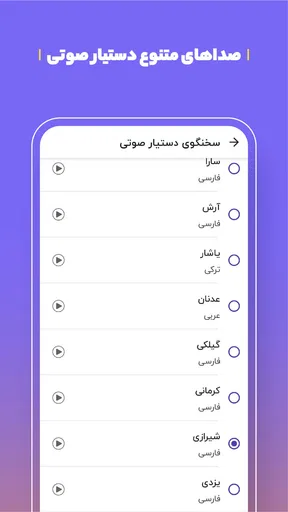
The Persian voice assistant is a distinct reason to consider Balad rather than assuming every map app will feel equally natural. Spoken directions are especially useful when the phone is mounted out of easy reach, when traffic needs your attention, or when you are trying to follow a route through streets whose names are unfamiliar. Before a longer drive, I would test the voice prompts at a safe stop and set a comfortable volume; a clear instruction only helps if it can be heard over the car and road noise.
Voice guidance is not a reason to stop checking the surroundings. In dense streets, a spoken turn can arrive close to an intersection, and a driver may need to compare it with lane markings and signs. I also find voice directions less convenient in quiet shared spaces or when I am walking with other people, so a glance at the screen may suit those moments better. The strongest use case is hands-busy travel where Persian prompts make following a route feel more direct.
Small-screen choices for walking and errands
A map used on foot has a different job from one used in a car. While walking to a café or a service nearby, I want to check the destination, orient myself, and keep the phone away again rather than stare at it for every step. Balad’s city-guide angle makes that sort of quick local search relevant, but I would still confirm the place name and location before setting out. Similar business names or a pin on the wrong side of a large road can turn a short errand into an unnecessary detour.
For a practical everyday example, imagine leaving work to meet a friend at a café in an unfamiliar district. I would search for the café before starting the journey, inspect where it sits on the map, and begin route guidance only once I was ready to move. If traffic is building, a navigation app’s live view can help me choose a sensible route; close to the destination, the map becomes useful for the final approach. That division—route planning first, careful arrival second—reduces the temptation to make last-second choices in traffic.
Worth Reading Before You Choose

Flipboard Shows What News Apps Must Do Beyond the Feed

Switching to Android Auto Means Rethinking Your Driving Routine

Google Calendar Makes a Crowded Week Easier to Manage

Ludo King Makes the Most of the Minutes Between Plans

Baby Panda World Brings Quick Play to Modern Phones, but Its Game Library Feels Busy

ESPN’s Live Game View Makes Following Close Games Easier
What to do when guidance becomes uncertain
Every navigation app can become less useful when location or network conditions are unstable, and I would treat Balad the same way. If the position marker seems out of step with the road, I would not immediately follow a sudden reroute. I would slow down only where safe, compare the map with visible street signs, and wait for the position to settle. Missing a turn is usually safer than reacting abruptly to a display that may be behind.
It also helps to think of recovery before a trip becomes stressful. Keep the phone charged, secure it in a mount when driving, and look at the route while stopped if an instruction does not make sense. If the app cannot provide useful guidance at a particular moment, switch to familiar landmarks or a known safe place to pause rather than repeatedly tapping through screens on the move. These are ordinary precautions, but they matter because a navigation screen can create confidence faster than the conditions justify.
Using maps without wasting attention or data
For data-conscious use, the most dependable first step is to avoid repeated destination searches and unnecessary map browsing while travelling. Decide where you are going, check the route while connected, and keep the screen focused on the journey. I would not assume that looking at a map once means it will remain fully available if the connection drops; that depends on the functions and map information available at that time. If data use is a concern, check the app’s behavior on your own device and network before relying on it for a long unfamiliar trip.
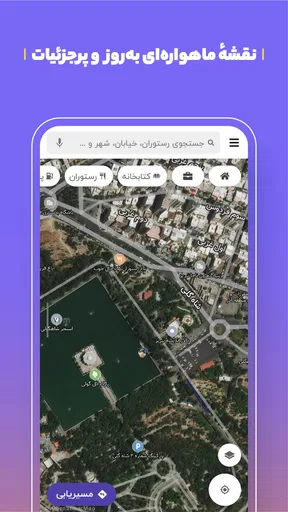
There is a trade-off between detail and distraction, too. Satellite or terrain views can help answer a specific question about an area, but they are not automatically the best view for following ordinary street directions. For everyday driving, I would use the clearest view for route reading and switch views only when a particular place is difficult to understand. A calmer screen is often more useful than a visually rich one when I have only a second to glance at it.
How Balad fits beside other navigation choices
Compared with familiar general-purpose map apps, Balad’s clearest point of distinction is its Persian voice assistant and focus on a city guide. If Persian spoken directions are central to your routine, that can make it more comfortable than an alternative whose guidance or local presentation feels less suited to you. If you already depend on another app for saved places, shared plans, or a particular mapping habit, switching may not be worthwhile unless Balad serves a specific local need better for you.
I would also separate the jobs rather than expect one app to be perfect at everything. A city map can help with getting across town and finding a nearby destination, while a dedicated transit service or a specialist walking tool may be a better fit for a journey where public transport details or pedestrian route planning matter most. The right comparison is not simply which app has the longest feature list; it is which one gives you understandable guidance for the journey you actually take.
Who is most likely to appreciate it?
Balad is a sensible candidate for people who travel around town regularly, want Persian voice guidance, and value having maps and local-place discovery together. It may suit drivers making frequent errands as well as someone visiting an unfamiliar part of a city and wanting to orient themselves. The app is free, rated for Everyone, and the current version is 4.74.1; it supports devices running Android 4.4 or later. Those details make it accessible to many Android users, though individual experience still depends on the phone and the conditions of a trip.
I would be more cautious if your journeys often take you through places with unreliable connectivity and you require guaranteed offline directions, or if you need a specialized navigation workflow that a general city map may not provide. I would also skip it as a sole source of guidance if you are uncomfortable checking road signs and handling an occasional uncertain location reading. For a straightforward city commute, however, a Persian-speaking guide and local map in one app can be a practical combination.
One question people naturally have is whether Balad can be trusted to make every route faster. I would not frame any traffic-aware navigator that way: conditions change, and the best route on a screen can still be affected by events on the road. Another is whether it replaces a separate guide to local places. It can support discovery as part of navigation, but I would verify the exact destination and opening arrangements through the information available to me before making a special trip. That small check is more useful than assuming every map pin answers every practical question.
My overall view is that Balad is most compelling when its Persian guidance and city-navigation focus match the way you move around. Its usefulness depends partly on having the connection and location signal needed for the task, so I would prepare before driving and keep a simple backup plan for unfamiliar routes. If those limits are acceptable, it is worth trying as a free everyday option; if offline certainty or a specialist travel mode is essential, another tool may be a better primary choice.
Hey there! So, I recently downloaded this app called بلد - مسیریاب، نقشه - Balad, and I have to say, it’s been quite the journey navigating through it. If you’re someone who’s constantly on the move, this app might just become your new best friend. Let me take you through my experience with it.
Getting Started with Balad
First things first, downloading بلد - مسیریاب، نقشه - Balad was a breeze. Available on both Android and iOS, it took just a few taps, and voila, I was ready to dive in. The app has a clean interface, which is always a good sign. You know that feeling when an app just feels right the moment you open it? Yeah, it was like that.
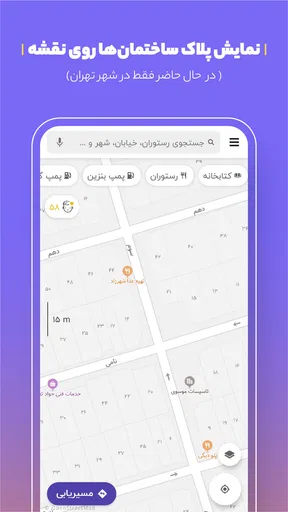
Setting up was straightforward. I had to allow location access, which is pretty standard for any navigation app. Once that was done, I was greeted with a sleek map interface. What I loved right off the bat was how intuitive everything felt. It wasn't cluttered, and the icons were easy to understand.
Navigation and Features
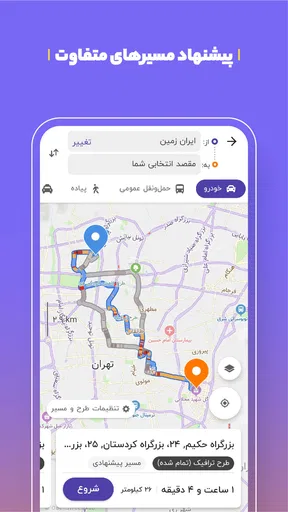
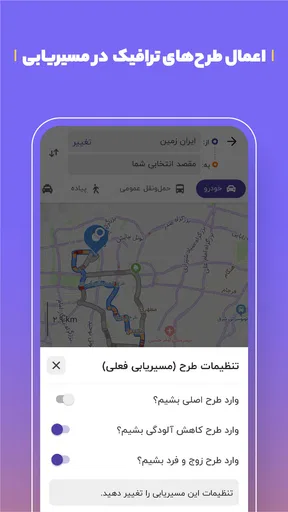
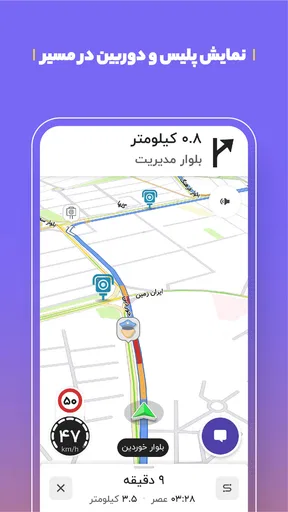
The main event here is the navigation, and I must say, Balad does a stellar job. Whether you're looking for the fastest route or the one with the least traffic, this app has you covered. It even includes real-time traffic updates which are a lifesaver during rush hour. I tried it out on my daily commute, and it consistently suggested routes that saved me time. Who doesn’t love avoiding traffic jams?
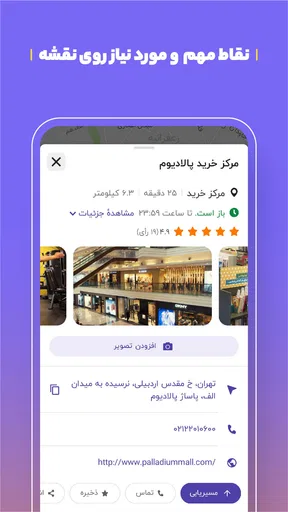
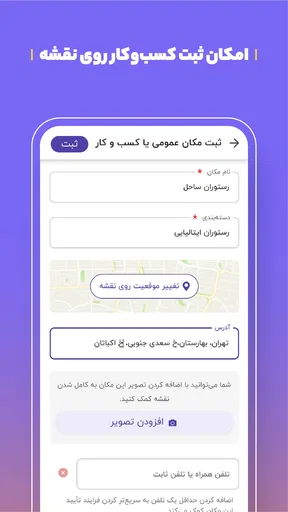
Beyond just giving directions, Balad also offers a bunch of other features. You can search for nearby places like restaurants, gas stations, and even ATMs. The local business integration is pretty neat. I found a new café to try out just by exploring the map. Plus, the voice-guided navigation is super clear, so no more missing turns because you couldn’t hear the directions!
User Experience
Let’s talk about user experience for a minute. Balad really shines here. The app runs smoothly, with no noticeable lag or crashes, which is always a relief. The developers have put in the effort to ensure that the app doesn’t just work, but works well.
Another thing I appreciate is the customization options. You can switch between different map views, like satellite or terrain, depending on what you prefer. It’s little touches like these that make a big difference.
Community Features
One of the standout features of Balad is its community aspect. Users can report traffic incidents, road closures, or any other obstacles. This crowd-sourced data means you're getting real-time information from people who are out there on the road. It’s like having a network of helpful friends on your commute.
Interacting with other users feels seamless. You can also contribute by sharing your own updates, which adds to the whole sense of community within the app. It’s rewarding to know that you’re helping others navigate their day just a little bit easier.
Final Thoughts
Wrapping it up, I have to say that the بلد - مسیریاب، نقشه - Balad app is a fantastic tool for anyone who spends a lot of time on the road. Its combination of reliable navigation, real-time traffic updates, and community-driven features make it a must-have. Whether you're commuting, running errands, or just exploring new parts of town, Balad has your back.
If you haven’t already checked it out, I’d highly recommend giving it a spin. Who knows, it might just change the way you navigate your world. Safe travels!
Pros
- User-friendly interface enhances navigation.
- Real-time traffic updates improve routing.
- Voice guidance supports hands-free use.
- Offline maps ensure access without data.
- Accurate location search for precise results.
Cons
- Limited international map coverage.
- Battery drainage during prolonged use.
- Occasional lag in traffic data updates.
- Requires large storage for offline maps.
- Ads can be intrusive on free version.
FAQs for بلد - مسیریاب، نقشه - Balad
What features does Balad offer for navigation?
Balad is equipped with real-time traffic updates, precise turn-by-turn navigation, and offline maps. It also provides voice guidance and lane assistance to ensure drivers can navigate unfamiliar routes with ease. The app includes points of interest along the route, such as gas stations and restaurants, enhancing the overall travel experience.
Is Balad available for both Android and iOS devices?
Yes, Balad is available for download on both Android and iOS platforms. Users can find the app on the Google Play Store for Android devices and the Apple App Store for iOS devices. This accessibility ensures that a wide range of users can benefit from its navigation features regardless of their preferred device.
How accurate is Balad in providing traffic updates?
Balad offers highly accurate traffic updates by utilizing real-time data from a variety of sources. This allows the app to provide users with up-to-date information about traffic congestion, road closures, and alternative routes. Such accuracy helps in minimizing travel time and avoiding potential delays during commutes or trips.
Can I use Balad without an internet connection?
Yes, Balad offers offline map capabilities, allowing users to download maps in advance and use them without an internet connection. This feature is particularly useful in areas with poor connectivity or when traveling abroad, ensuring that navigation services remain uninterrupted and reliable at all times.
Does Balad offer any customization options for users?
Balad provides several customization options to enhance user experience. Users can choose different voice guidance languages, adjust map themes, and customize navigation settings according to their preferences. These options allow users to tailor the app to best meet their unique navigation needs and preferences.


